Applies To:
- CDE4330
- CDE5530
- CDE6530
- CDE7530
- CDE8630
- CDE9830
- CDE12 Series
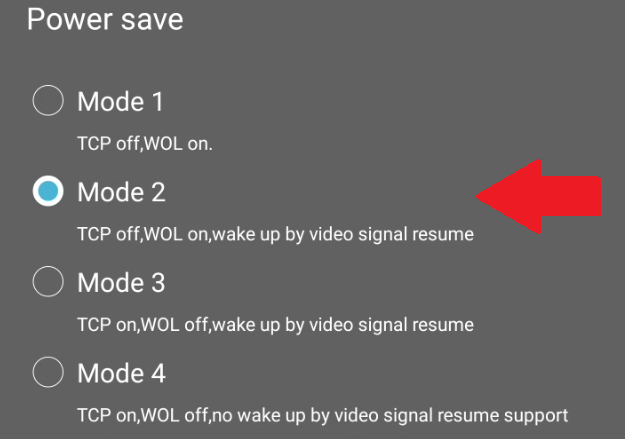
The following displays offer four Power Save modes available, each suited to different applications. In this context, we will focus on digital signage, information and monitoring systems, and meeting rooms, such as ViewSonic’s TeamJoin and Microsoft Teams Rooms solutions, where always-on functionality, wake-up on active signal, and fast boot times are essential. By default, the system is set to Power Save Mode 1 out-of-the-box.
Power Modes:
- Power Save: Mode 1 (Default)
This is to maximize power saving and to meet EnergyStar® certification. - Power Save: Mode 2
Ideal when you need HDMI-CEC function. The boot time is about 30 +/- seconds from power on.- Set HDMI with One Wire to On.
- Set HDMI with One Wire to On.
- Power Save: Mode 3
Ideal for digital signage, information and monitoring systems and meeting rooms. The boot time is within 5 seconds.- Set Auto signal detection to On.
- Set No Signal Standby to 0 min
- Power Save: Mode 4
Ideally used in an environment for people using control panels but where the device/monitor is not allowed to respond on signal input and all is controlled by an integrated System
Instructions:
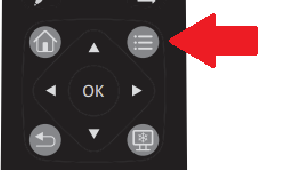
- Press the Settings Icon on the remote control to enter OSD menu settings.
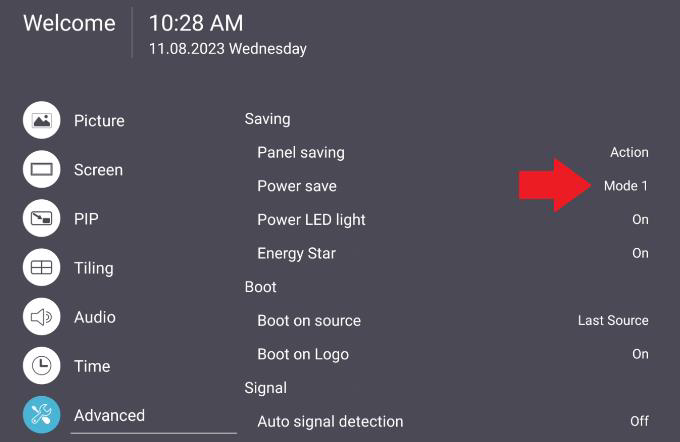
- Now go to Advanced menu and highlight the Power save option to set the mode.
For additional questions, please contact ViewSonic's Support by submitting a support ticket HERE or by Phone: US: 800-688-6688, CAN: 866-463-4775. ViewSonic’s call center hours: M-F, 6 AM - 6 PM PST
Was this article helpful?
That’s Great!
Thank you for your feedback
Sorry! We couldn't be helpful
Thank you for your feedback
Feedback sent
We appreciate your effort and will try to fix the article