Applies to:
- LDM
- LDS138
- LDP
This instruction guide describes the process for updating both the Android system firmware and HDMI chip firmware on the ViewSonic DvLED displays using a USB thumb drive.
IMPORTANT NOTES:
- Do NOT power off the display during any update.
- Do NOT disconnect AC power during the update.
- Do NOT remove the USB thumb drive until the upgrade completes.
- Interrupting the update may corrupt firmware and render the unit unusable.
Required Materials
- FAT32-formatted USB thumb drive (How to format a USB Drive to FAT32)
- The update.img file for Android firmware
- The update_HDMI.bin file for HDMI chip firmware
Instructions:
Part 1: Android System Firmware Update
A. Firmware flash via Android OS
- Copy the update.img file to the root directory (not inside any folder) to a FAT32 formatted USB drive.
- Ensure the display is powered ON and insert the USB thumb drive into the designated USB port within the system control box.
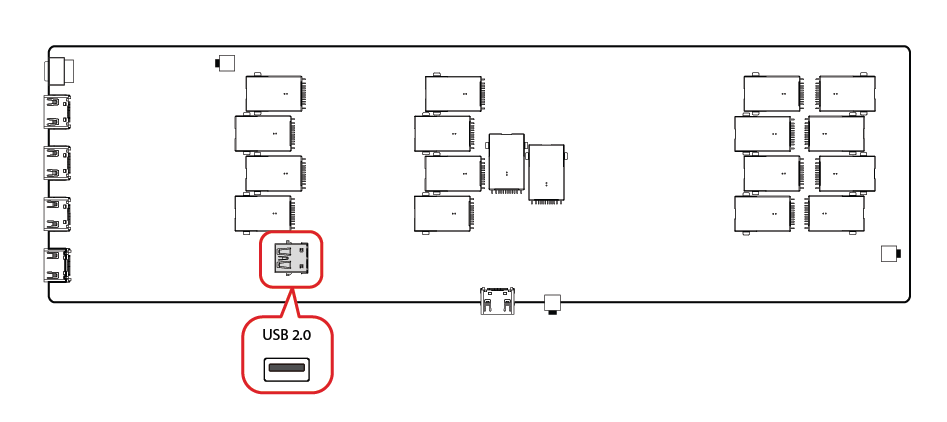
- On the display, navigate to:
- Settings → System → About → Local System Updates → Android System → Confirm

- The Power LED will flash red/green alternately.
- The upgrade process takes approximately 5 minutes.
- The display will automatically restart after the update.
- Settings → System → About → Local System Updates → Android System → Confirm
- After rebooting, navigate to:
- Settings → About → Update Monitor / HDMI Chip Firmware
- Confirm the displayed version matches the expected firmware revision.
B. Power Key Method
- Start with the DvLED OFF.
- The rocker power switch has to be set to OFF
- Expose the main board by removing the control box cover or removing the tiles in a hidden control box configuration.
- Insert the USB drive on the front panel's USB 2.0 (black) port.

- Press and hold the POWER button on the main board and the front panel.
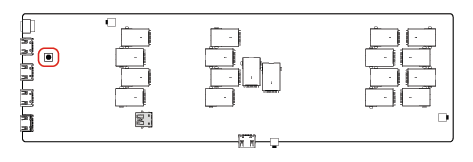
- While holding the two power buttons, switch the power rocker switch to ON. The power indicator LED will begin blinking.
The display will not show anything on the screen during this process. Once completed, the display will restart and the ViewSonic logo will appear.
Part 2: HDMI Chip Firmware Update
- Copy the update_HDMI.bin file to the root directory.
- Insert USB thumb drive into the designated USB port on the display.
- On the display, navigate to:
- Settings → System → About → Local System Updates → HDMI Chip → Confirm

- Once the HDMI update finishes, the display will automatically power OFF.
- Settings → System → About → Local System Updates → HDMI Chip → Confirm
- Power the unit back ON.
- Navigate to:
- Settings → About → Update Monitor / HDMI Chip Firmware
- Verify the firmware version is correct.
For additional questions, please contact ViewSonic's Support by submitting a support ticket HERE or by Phone: US: 800-688-6688, CAN: 866-463-4775. ViewSonic’s call center hours: M-F, 6 AM - 6 PM PST.
Was this article helpful?
That’s Great!
Thank you for your feedback
Sorry! We couldn't be helpful
Thank you for your feedback
Feedback sent
We appreciate your effort and will try to fix the article