Affects:
VPCF5 Series Slot-PC
IFP50-5 Series displays running Android 13
Cause:
The EDID information and colorspace are set incorrectly by default when this combination of display and VPC is used.
To Resolve:
- Access the debug menu by pressing "INPUT 9 9 1" on the remote control.
- Select "Machine Setting"
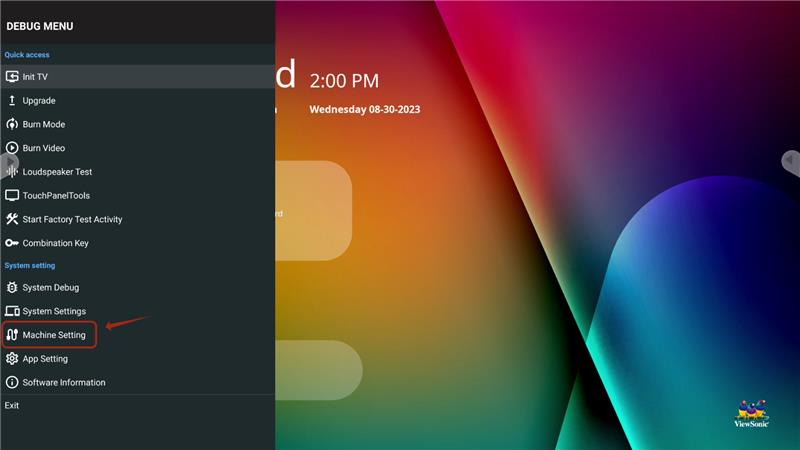
- Set the HDMI EDID option to "4K60Hz_YUV420
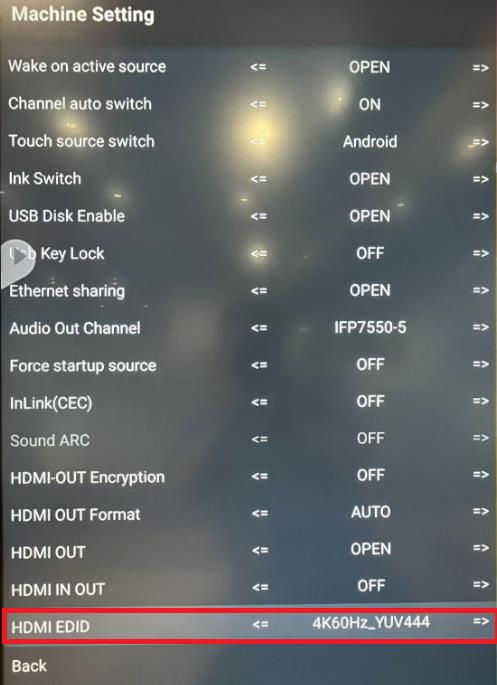
- The display will reboot, and the settings will then be saved.
For additional questions, please contact ViewSonic's Support by submitting a support ticket HERE or by Phone: US: 800-688-6688, CAN: 866-463-4775. ViewSonic’s call center hours: M-F, 6 AM - 6 PM PST
Was this article helpful?
That’s Great!
Thank you for your feedback
Sorry! We couldn't be helpful
Thank you for your feedback
Feedback sent
We appreciate your effort and will try to fix the article